Smart Home Network Guide: Wireless Connectivity, Device Integration, Security Controls, and Planning Information
A smart home network provides the communication infrastructure that connects devices such as thermostats, cameras, smart locks, lighting systems, appliances, sensors, speakers, and home automation hubs.
These devices may communicate through Wi-Fi, Bluetooth, Zigbee, Z-Wave, Thread, Ethernet, or other connectivity technologies.
A well-planned network can help connected devices communicate reliably while maintaining appropriate security and privacy controls.
Why Smart Home Networking Matters
As the number of connected devices increases, the home network becomes an important part of overall smart-home operation.
A connected home may depend on the network for:
Device communication
Mobile-app access
Remote controls
Security notifications
Video streaming
Automation routines
Firmware updates
Cloud connectivity
Voice-control systems
Energy monitoring
Network performance and configuration can therefore affect both convenience and the reliability of connected-home features.
What Is a Smart Home Network?
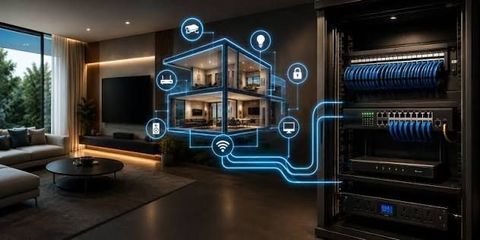
A smart home network is a combination of networking equipment, wireless technologies, connected devices, and software that allows household technology to communicate.
A typical setup may include:
Internet connection
Modem or gateway
Wi-Fi router
Mesh Wi-Fi nodes
Ethernet connections
Smart-home hub
Connected devices
Mobile applications
Cloud platforms
Some devices communicate directly with the router, while others may communicate through a dedicated hub or bridge.
Wireless Connectivity Technologies
Different smart-home devices use different communication technologies.
Wi-Fi
Wi-Fi is widely used for devices that require relatively high bandwidth or direct internet connectivity.
Common applications include:
Security cameras
Smart televisions
Smart speakers
Appliances
Computers
Mobile devices
Smart displays
Wi-Fi performance depends on factors such as distance, building materials, network congestion, router placement, device capabilities, and wireless configuration.
Bluetooth
Bluetooth is commonly used for short-range device communication and initial device setup.
Applications can include:
Sensors
Smart locks
Wearable devices
Speakers
Device configuration
Bluetooth generally serves different purposes from whole-home Wi-Fi networking and may be combined with other technologies.
Zigbee
Zigbee is a low-power wireless technology frequently used for smart-home sensors, lighting, switches, and other connected devices.
Many Zigbee networks use mesh communication, allowing compatible devices to help extend network coverage.
Z-Wave
Z-Wave is another wireless technology designed for connected-home applications.
It is commonly associated with:
Smart locks
Sensors
Lighting controls
Security equipment
Automation devices
Compatibility depends on the device, controller, frequency region, and platform.
Thread
Thread is a low-power mesh networking technology designed for connected devices.
It can be particularly relevant to modern smart-home ecosystems because compatible devices can communicate through a mesh network without relying on every device having a direct Wi-Fi connection.
Thread can also work alongside higher-level smart-home platforms.
Wi-Fi Router and Network Planning
The router is a central component of many home networks.
When planning a smart-home network, homeowners can consider:
Wireless coverage
Router location
Supported Wi-Fi generation
Number of connected devices
Internet bandwidth
Ethernet availability
Network congestion
Security features
Guest-network support
Device compatibility
Placing a router in a central location can sometimes improve wireless coverage, although building construction and interference also affect performance.
Mesh Wi-Fi Systems
Mesh Wi-Fi systems use multiple network nodes to provide wireless coverage across a larger area.
They can be useful in:
Large homes
Multi-story properties
Homes with difficult wireless coverage
Properties with numerous connected devices
A mesh system can reduce coverage gaps, but adding more nodes does not automatically improve performance. Node placement, backhaul connections, interference, and device capacity remain important.
Smart Home Hubs and Bridges
Some smart-home devices communicate through a hub rather than connecting directly to the Wi-Fi router.
A hub can provide communication between compatible devices and a broader automation platform.
Potential benefits include:
Centralized device management
Support for multiple protocols
Local automation
Device coordination
Reduced Wi-Fi dependence for selected devices
Compatibility should be checked before choosing a hub because different ecosystems may support different protocols and device categories.
Device Integration
Device integration allows different smart-home products to work together.
For example, a home automation routine might connect:
Motion Sensor → Smart Lighting → Home Automation Platform
Another setup might connect:
Door Sensor → Security System → Mobile Notification
Integration can make a smart home more useful, but compatibility depends on device standards, software platforms, communication protocols, and manufacturer support.
Smart Home Automation Platforms
Automation platforms can provide a central interface for connected devices.
Depending on the platform, users may be able to:
Create automation routines
Monitor device status
Control devices remotely
Configure schedules
Connect multiple protocols
Receive notifications
Manage household scenes
Users should review compatibility before purchasing additional devices because not every product works with every automation platform.
Network Segmentation
Separating devices across different network segments can provide an additional security layer.
For example, a home may use:
Primary network for computers and phones
Separate network for guests
Dedicated or isolated network for selected smart devices
Network segmentation can help limit the potential impact if a connected device becomes compromised.
The exact configuration depends on the router or network equipment and the user's technical requirements.
Smart Home Network Security
Connected devices can create additional security considerations because they communicate through networks and may use cloud-based accounts.
Important security practices include:
Change default passwords
Use strong, unique credentials
Enable multi-factor authentication where available
Keep router firmware updated
Update smart-device firmware
Disable unnecessary remote access
Review connected accounts
Remove unused devices
Secure the wireless network
Use appropriate network segmentation
Review device permissions
Security should be considered when devices are first installed rather than added later as an afterthought.
Guest Networks
A guest network can separate visitors' devices from the primary household network.
It may be useful for:
Visitors' phones
Guest laptops
Temporary devices
Selected connected equipment
The exact isolation provided depends on router configuration.
A guest network should not automatically be assumed to provide complete isolation unless the network equipment is configured accordingly.
Smart Home Privacy
Connected-home devices can collect information about household activity.
Depending on the device, data may include:
Device status
Voice recordings
Video
Motion events
Location information
Usage patterns
Account information
Automation history
Before connecting a device, users should review its privacy documentation and understand:
What information is collected
Where data is stored
Whether cloud processing is used
How long information is retained
Whether data is shared
How accounts can be removed
What security controls are available
Privacy requirements can vary by location and device type.
Network Reliability
A smart-home network should be designed around the devices that matter most.
Network reliability can be affected by:
Wireless interference
Thick walls
Long distances
Network congestion
Router limitations
Internet outages
Power interruptions
Device firmware problems
Cloud-platform availability
Critical devices may benefit from wired Ethernet connections where practical.
For important security or automation functions, users should also understand what happens when internet connectivity is unavailable.
Internet vs. Local Automation
Some smart-home systems rely heavily on cloud connectivity, while others can perform selected functions locally.
Cloud-dependent systems
These may use remote servers for:
Account management
Remote access
Data processing
Notifications
Automation
Local systems
Some systems can perform selected automation functions within the home network.
Potential benefits can include:
Reduced dependence on internet connectivity
Faster local responses
Greater local control over certain data
The actual capabilities depend on the device and platform.
Smart Home Network Performance
Network performance can be assessed using several factors.
Important considerations include:
| Factor | Why It Matters |
|---|---|
| Coverage | Helps devices maintain connectivity |
| Bandwidth | Supports data-intensive devices |
| Latency | Affects response time |
| Capacity | Determines how many devices can operate reliably |
| Interference | Can reduce wireless performance |
| Backhaul | Affects mesh-network communication |
| Reliability | Influences automation and monitoring |
| Security | Helps protect connected devices |
A network that works well for basic internet browsing may not necessarily provide the same experience when dozens of connected devices are operating simultaneously.
Smart Home Network Planning Checklist
Before expanding a connected home, users can review:
Identify the number and type of connected devices
Map important areas of the home
Review Wi-Fi coverage
Identify devices requiring high bandwidth
Determine whether mesh Wi-Fi is appropriate
Check device communication protocols
Review smart-hub compatibility
Consider Ethernet for suitable devices
Enable strong network security
Update router and device firmware
Configure guest-network controls
Consider network segmentation
Review device privacy settings
Check cloud and local-control requirements
Plan for power or internet interruptions
Recent Developments in Smart Home Networking
Smart-home networking continues to evolve as connected-device ecosystems become more interoperable.
Technologies such as Thread and newer Wi-Fi generations are contributing to improved connectivity options, while broader smart-home standards can make it easier for compatible products from different ecosystems to interact.
Another development is greater emphasis on local processing and network security. Some connected-home platforms increasingly support local automation, while manufacturers continue to improve device authentication, firmware management, and security controls.
The growing number of connected devices also makes network capacity and security planning increasingly relevant to smart-home design.
Tools and Resources
Useful resources for smart-home network planning include:
Wi-Fi router management tools
Wireless signal-analysis tools
Mesh Wi-Fi systems
Ethernet networking equipment
Smart-home hubs
Network monitoring tools
Device-management applications
Firmware-update systems
Multi-factor authentication
Router security documentation
Manufacturer compatibility guides
Smart-home protocol documentation
Frequently Asked Questions
What is a smart home network?
A smart home network connects household devices, networking equipment, automation platforms, and communication technologies so that compatible devices can exchange information and be controlled through connected systems.
Does every smart home device use Wi-Fi?
No. Smart-home devices can use Wi-Fi, Bluetooth, Zigbee, Z-Wave, Thread, Ethernet, or other communication technologies depending on their design and intended function.
Is mesh Wi-Fi useful for a smart home?
Mesh Wi-Fi can help provide wireless coverage across larger or multi-level homes. Its usefulness depends on property layout, device locations, network requirements, and node placement.
Should smart home devices be on a separate network?
Network separation can provide an additional security layer for selected connected devices. Whether it is appropriate depends on the router, devices, household requirements, and desired security configuration.
How can I secure my smart home network?
Use strong network credentials, update router and device firmware, enable multi-factor authentication where available, remove unused devices, review remote-access settings, and consider appropriate network segmentation.
Conclusion
A smart home network provides the connectivity foundation for modern connected-home systems.
Effective planning involves more than choosing a faster router. Homeowners should consider wireless coverage, communication protocols, device compatibility, network capacity, security controls, privacy, local versus cloud functionality, and future expansion.
As smart-home ecosystems continue to evolve, a well-organized network can make it easier to integrate devices while maintaining appropriate security and reliability.

Related Post...



Trust Administration Guide: Trustee Duties, Estate Assets, Beneficiary Rules, and Legal Information
Updated: October 05, 2026
Read More