What Is Business Software and Why It Matters for Everyday Operations
Business software refers to computer programs designed to help organizations manage daily tasks, organize information, and support decision-making.
From tracking sales and handling customer inquiries to managing employee schedules and monitoring finances, these tools streamline work that once required stacks of paper or hours of manual effort. For many companies, large and small, business software has become a practical way to reduce repetitive work and keep operations running more smoothly.
Understanding the Core Purpose of Business Software
At its heart, business software collects, stores, and processes data so teams can focus on higher-value activities. Instead of searching through spreadsheets or emails, staff can pull up the information they need in seconds. This shift improves accuracy and frees time for customer service, product development, or strategy.
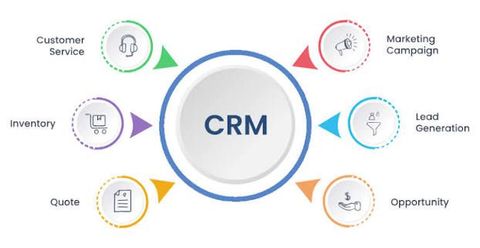
Most business software falls into a few broad categories. Accounting tools handle invoices, expenses, and tax preparation. Customer relationship management (CRM) systems store contact details, purchase history, and communication logs. Project management platforms assign tasks, set deadlines, and track progress. Human resources software manages payroll, benefits, and employee records. Inventory and supply-chain programs monitor stock levels and supplier orders.
Key Types of Business Software in Common Use
Different businesses need different combinations of tools. A retail shop might rely heavily on point-of-sale and inventory software, while a consulting firm may prioritize CRM and time-tracking applications. Cloud-based options allow teams to access data from any location with an internet connection, while on-premise versions keep everything on local servers for those who prefer full control over their data.
Here is a simple comparison of popular categories:
| Category | Main Function | Typical Users |
|---|---|---|
| Accounting software | Track income, expenses, and reports | Finance teams, small businesses |
| CRM software | Manage customer interactions | Sales and support staff |
| Project management tools | Plan tasks and monitor deadlines | Teams across departments |
| HR and payroll systems | Handle employee data and payments | Human resources departments |
| Inventory management | Monitor stock and supplier orders | Retail and manufacturing |
Benefits That Support Daily Work
Using business software can reduce errors that occur with manual data entry. Automated calculations in accounting tools, for example, lower the chance of simple arithmetic mistakes. Centralized customer records help sales teams avoid duplicate outreach and respond faster to inquiries.
Collaboration also improves. When multiple people can view and update the same project board or shared calendar, communication becomes clearer. Many programs send automatic reminders for upcoming deadlines or low stock levels, helping teams stay ahead of potential problems.
Over time, the data collected by these systems can reveal useful patterns. Managers may notice which products sell best in certain seasons or which customer service issues appear most often. This information supports better planning without requiring advanced technical skills.
How to Choose Suitable Business Software
Selecting the right tools starts with identifying the biggest pain points. A company that struggles with late invoices may benefit most from accounting software with strong payment tracking. One that loses track of customer conversations might need a CRM first.
Cost is another practical factor. Some programs charge a monthly subscription based on the number of users, while others offer one-time licenses. Free or low-cost entry versions exist for many categories, allowing smaller teams to test features before committing more resources.
Ease of use matters for non-technical staff. Programs with clean menus, clear labels, and helpful tutorials tend to see faster adoption. Checking whether the software works well with tools already in use—such as email or existing spreadsheets—can prevent compatibility headaches.
Security and data privacy should also be considered. Reputable providers explain how they protect information and whether they meet common industry standards. Reading recent user reviews and requesting short trials can provide a clearer picture of real-world performance.
Practical Steps for Getting Started
Begin with a short list of must-have features rather than trying to solve every possible need at once. Involve the people who will use the software daily so their feedback shapes the final choice. After installation or setup, schedule brief training sessions so everyone understands the basic functions.
Regular reviews help keep the tools effective. As a business grows or changes, the original software may need adjustments or additional modules. Many providers offer customer support and online resources that make these updates manageable.
Frequently Asked Questions About Business Software
What is the difference between business software and regular computer programs?
Business software focuses on organizational tasks such as finance, customer management, or inventory, while general programs like word processors or web browsers serve broader personal or creative purposes.
Do small businesses really need specialized software?
Many small teams start with basic tools and add more advanced options only when manual methods become too time-consuming or error-prone. Starting simple often works best.
Is cloud-based business software safe?
Reputable providers use encryption and regular security updates. Users should still follow good practices such as strong passwords and limited access permissions.
How long does it take to learn new business software?
Most modern tools are designed for quick adoption. Basic functions can often be learned in a few hours, with deeper features mastered over weeks of regular use.
Can different types of business software work together?
Many programs offer integrations that allow data to flow between systems, reducing the need to enter the same information more than once.
Conclusion
Business software helps organizations organize information, reduce repetitive tasks, and support clearer decision-making. By matching tools to specific needs—whether accounting, customer management, project tracking, or inventory—teams can work more efficiently and with fewer errors. Choosing thoughtfully, starting with the most pressing requirements, and allowing time for staff to become comfortable with the new systems increases the chances of lasting benefits. As everyday operations continue to rely on digital tools, understanding the practical role of business software remains a useful foundation for any size of organization.

Related Post...

Starlink Explained: How SpaceX Satellite Internet Brings High-Speed Connectivity Anywhere
Updated: October 20, 2026
Read More
Industrial PCs Explained: A Clear Guide with Helpful Tips, Information, and Expert Advice
Updated: April 15, 2026
Read More