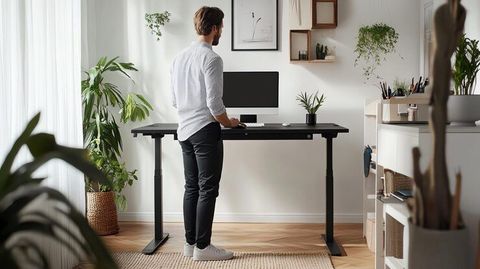
Guide to Choosing Standing Desks for Home Offices With Better Stability and Height Range
Standing desks are designed to let people work while sitting, standing, or alternating between these positions. They have become a common consideration in home office planning as remote work, hybrid schedules, and computer-based tasks have increased the amount of time many people spend at a desk.
A standing desk may have a fixed height, a manual adjustment mechanism, or an electric motor that raises and lowers the work surface. Height-adjustable models allow users to adapt the desk to different tasks and body proportions. Some models also include programmable height settings, cable management, and built-in controls.
Choosing a suitable standing desk involves more than appearance. Stability, adjustment range, desktop dimensions, lifting capacity, noise, durability, and overall value all affect its practical usefulness.
Common Types of Standing Desks
Several designs are available for home offices.
Electric standing desks: Use motors to raise or lower the desktop with a control panel.
Manual standing desks: Use a hand crank or mechanical adjustment system.
Fixed-height standing desks: Maintain one working height and generally require a separate seating arrangement.
Desktop converters: Sit on an existing desk and provide a raised platform for a monitor, keyboard, and other equipment.
L-shaped standing desks: Provide a larger work surface for multiple monitors, documents, or separate work activities.
Each design has different space requirements and adjustment capabilities. Electric models can simplify frequent height changes, while manual desks may appeal to users who prefer a mechanical system. Desktop converters can be useful when replacing the entire desk is impractical.
What Makes a Standing Desk Suitable?
A suitable desk should accommodate the user's body dimensions, equipment, available room, and typical work activities. Its adjustment mechanism should operate smoothly, and the frame should remain stable when the desktop is raised.
Important specifications include:
Minimum and maximum desktop height.
Frame construction and resistance to wobbling.
Maximum supported load.
Desktop width, depth, and shape.
Motor performance and adjustment speed.
Warranty coverage and availability of replacement components.
Specifications should be assessed together rather than individually. A desk with a wide height range may still be unsuitable if its frame becomes unstable at standing height or its desktop is too shallow for the intended monitor arrangement.
Why Stability, Height Range and Value Matter
A standing desk should support everyday work without excessive movement, awkward positioning, or unnecessary adjustments. These factors influence comfort, reliability, and long-term usefulness.
Desk Stability and Frame Construction
Stability becomes especially important when a desk is raised to its maximum height. A desk that feels firm while seated may wobble when standing, particularly when supporting multiple monitors or heavy equipment.
Consider the following characteristics:
Frame material: Steel frames are commonly used for structural support.
Leg design: Wider bases and well-engineered cross-supports can help reduce movement.
Desktop attachment: Secure mounting helps keep the work surface firmly connected to the frame.
Weight capacity: The rated load should accommodate monitors, computers, accessories, and other equipment.
Movement during typing: Excessive movement can make detailed computer tasks less comfortable.
A two-leg electric desk may suit many home offices, while some larger configurations use additional structural support. Stability depends on the complete design, assembly quality, floor conditions, and desk height rather than the number of motors alone.
Height Range and Ergonomic Adjustment
Height range describes the lowest and highest positions available on an adjustable desk. A suitable range should accommodate the user's seated and standing working positions.
For many adults, a desk with an adjustment range of approximately 60–125 cm may be worth evaluating, although individual requirements vary. Taller users or people with specific ergonomic needs may require a different range.
The keyboard should generally sit near elbow height, with relaxed shoulders and straight wrists. When standing, the monitor should be positioned so the head remains comfortably aligned with the torso.
Comparing Standing Desk Specifications
The following table provides general evaluation guidelines rather than universal product requirements.
Feature | What to evaluate | Why it matters |
|---|---|---|
Height range | Lowest and highest settings | Supports different body dimensions |
Frame stability | Movement at maximum height | Helps maintain a steady workspace |
Load capacity | Total supported equipment weight | Reduces the risk of overloading |
Desktop depth | Space for monitor and keyboard | Supports comfortable positioning |
Adjustment mechanism | Smoothness and reliability | Makes position changes easier |
Controls | Presets and simple operation | Helps users adjust the desk consistently |
Understanding Overall Value
Value involves more than the initial purchase price. It includes expected durability, adjustment performance, maintenance requirements, warranty terms, and the desk's suitability for daily use.
An inexpensive desk may meet basic requirements but lack the stability needed for a large monitor setup. A more advanced model may include programmable controls and better cable management, although these features are useful only when they match the user's needs.
Recent Trends in Standing Desk Design
During 2025 and 2026, home office furniture design continued to emphasize ergonomic flexibility, compact workspaces, integrated cable management, and adjustable furniture.
Electric Controls and Programmable Settings
Electric standing desks increasingly feature digital control panels, memory presets, and collision-detection functions. Presets can make it easier to return to preferred seated and standing heights.
Collision detection may stop or reverse movement when resistance is detected, depending on the design. It should not be treated as a substitute for keeping children, pets, cables, and objects clear of moving parts.
Compact Workstations and Cable Management
Smaller home offices have encouraged interest in desks with compact frames, shallow desktops, integrated cable trays, and accessories for monitor positioning.
Before selecting a compact model, users should confirm that the desktop can accommodate their equipment without forcing the monitor too close or placing the keyboard at an awkward angle.
Durability and Furniture Testing
Structural durability remains an important consideration in adjustable desk design. The ANSI/BIFMA X5.5-2021 standard covers desk and table products, including height-adjustable tables, and includes tests relating to stability and structural performance. It remains a useful reference when evaluating relevant product documentation.
Consumers should distinguish between a manufacturer's general statement about durability and evidence that a particular model has undergone applicable testing.
Laws, Safety Standards and Workplace Policies
Standing desks are influenced by product safety requirements, electrical safety rules, workplace ergonomics guidance, and organizational policies. The precise requirements depend on the country and whether the desk is used in a private home or a regulated workplace.
Workplace Ergonomics in the United States
The Occupational Safety and Health Administration (OSHA) provides guidance on computer workstation ergonomics. Its recommendations address monitor placement, keyboard height, leg clearance, neutral posture, and changing working positions.
OSHA does not establish a single universally correct workstation arrangement for every person. Its guidance emphasizes adjusting the workstation to the user and task.
The ANSI/BIFMA X5.5-2021 standard provides a framework for evaluating desk and table performance, including applicable stability and structural tests. It is a voluntary industry standard unless incorporated into a relevant requirement or contract.
Considerations for India and Other Countries
In India, home office desk selection may involve applicable electrical safety requirements for powered equipment, product documentation, and general workplace health and safety considerations. Requirements for an individual home office may differ from those applicable to an employer's premises.
International users should check relevant national product safety rules, electrical standards, and workplace ergonomic guidance. A desk marketed internationally should not automatically be assumed to meet every country's requirements.
Tools and Resources for Choosing a Standing Desk
Several practical tools can help users compare specifications and prepare a comfortable home office.
Useful Planning Tools
Desk height calculator: Estimates a suitable starting height based on body measurements.
Room measurement checklist: Records available width, depth, clearance, and cable access.
Equipment weight worksheet: Adds the approximate weight of monitors, computers, and accessories.
Ergonomic workstation checklist: Reviews monitor placement, keyboard position, wrist alignment, and legroom.
Maintenance log: Tracks unusual movement, adjustment problems, and periodic inspections.
A desk height calculator is only a starting point. Final adjustment should be based on actual posture, keyboard position, footwear, and monitor height.
A Simple Desk Evaluation Checklist
Before choosing a model, confirm that:
The minimum height supports a comfortable seated position.
The maximum height supports a comfortable standing position.
The frame remains stable at commonly used heights.
The desktop accommodates all essential equipment.
The lifting capacity is appropriate for the total load.
Electrical cables remain clear of moving components.
Controls are straightforward to operate.
Warranty and maintenance terms are clearly documented.
Frequently Asked Questions
Are electric standing desks better than manual desks?
Electric desks make frequent height adjustments easier, while manual desks avoid reliance on powered lifting motors. Suitability depends on adjustment frequency, available space, budget, and personal preferences.
What height should a standing desk be?
The appropriate height allows the keyboard to sit near elbow level while the shoulders remain relaxed and wrists stay straight. The correct measurement varies with body proportions and footwear.
How much weight should a standing desk support?
The desk's rated capacity should exceed the combined weight of the desktop equipment and accessories. Users should also check whether the manufacturer's rating includes the desktop itself and whether load distribution affects stability.
Do standing desks eliminate the problems associated with sitting?
No. Standing desks provide another working position, but prolonged standing can also cause discomfort and fatigue. Alternating

Related Post...

Insights Into Modern Backyard Swing Chair Designs for Every Outdoor Setting
Updated: October 28, 2026
Read More
Explore Personalized Bedroom Furniture Ideas for Comfort, Style, and Space Optimization
Updated: October 26, 2026
Read More
Discover Smart-Lift Coffee Table Designs That Blend Comfort and Convenience
Updated: October 26, 2026
Read More