Home Jewellery Machine Business Auto Blog Furniture Education Fashion Tech Finance Health Software Real Estate Travel

Workflow Management Software Guide: Explore Process Automation, Features & Expert Insights

Organizations across industries manage hundreds of recurring processes every day, ranging from employee onboarding and customer support to document approvals, procurement, project coordination, financial operations, and compliance reporting. As businesses grow, manually handling these repetitive activities can become increasingly complex, making consistency, visibility, and collaboration more challenging.

Workflow management software helps organizations organize, monitor, and automate business processes by providing structured digital workflows. Instead of relying solely on emails, spreadsheets, or paper-based procedures, workflow platforms enable teams to define process steps, assign responsibilities, track progress, automate notifications, and generate reports from a centralized system.

Modern workflow management solutions often incorporate automation technologies, cloud computing, artificial intelligence (AI), low-code development, analytics dashboards, mobile accessibility, and integrations with other business applications. These capabilities help organizations streamline routine operations while improving process transparency and operational efficiency.

This guide provides an educational overview of workflow management software, explaining workflow concepts, automation technologies, common features, business applications, implementation considerations, and emerging industry trends.

What Is Workflow Management Software?

Workflow management software is a digital platform that helps organizations design, organize, automate, monitor, and improve business processes.

A workflow generally represents a sequence of activities required to complete a specific business task.

Examples include:

  • Document approvals
  • Employee onboarding
  • Purchase requests
  • Customer support tickets
  • Expense approvals
  • Contract reviews
  • Leave requests
  • Project workflows
  • Compliance documentation
  • Internal communications

The software provides structured process management across these activities.

Understanding Workflow Management

Workflow management focuses on organizing tasks into logical sequences that define:

  • Task order
  • Responsibilities
  • Decision points
  • Notifications
  • Deadlines
  • Approvals
  • Documentation
  • Reporting

Clearly defined workflows help improve consistency across business operations.

Workflow vs Business Process Management

Although related, these concepts have different scopes.

Workflow Management

Primarily focuses on automating and organizing individual operational processes.

Business Process Management (BPM)

Provides a broader framework for analyzing, improving, governing, and optimizing multiple organizational processes.

Many workflow platforms include BPM-related capabilities.

How Workflow Management Software Works

A typical workflow follows several stages.

Step 1: Process Design

Organizations define the workflow structure.

This may include:

  • Tasks
  • Approvals
  • Conditions
  • Notifications
  • Deadlines

Step 2: Workflow Creation

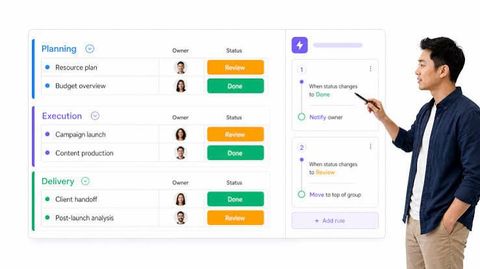
The process is configured using visual workflow builders or low-code tools.

Step 3: Task Assignment

Responsibilities are assigned to appropriate users or departments.

Step 4: Automation

Rules automatically trigger actions such as:

  • Email notifications
  • Status updates
  • Task creation
  • Document routing
  • Escalations

Step 5: Monitoring

Managers track workflow progress through dashboards and reports.

Step 6: Completion

Completed workflows are documented and archived according to organizational policies.

Core Features

Modern workflow management software commonly includes:

Visual Workflow Builder

Many platforms provide drag-and-drop interfaces for designing workflows without extensive programming knowledge.

Task Management

Organizations can:

  • Assign tasks
  • Track progress
  • Set priorities
  • Monitor deadlines
  • View workload distribution

Approval Workflows

Approval processes often support:

  • Multi-level approvals
  • Conditional routing
  • Digital approvals
  • Notification systems
  • Audit trails

Document Management

Workflow platforms frequently organize:

  • Digital documents
  • Attachments
  • Version history
  • File sharing
  • Secure storage

Notifications

Automated notifications help users stay informed about:

  • Pending tasks
  • Deadlines
  • Status changes
  • Workflow updates
  • Approval requests

Process Automation

Automation reduces repetitive manual activities.

Examples include:

  • Data entry automation
  • Email notifications
  • Document routing
  • Reminder generation
  • Status updates
  • Escalation rules
  • Task assignment
  • Workflow scheduling

Automation rules vary depending on platform capabilities.

Collaboration Features

Workflow platforms often support team collaboration through:

  • Shared workspaces
  • Comments
  • Activity logs
  • File sharing
  • Team notifications
  • Task discussions
  • Progress tracking
  • Real-time updates

Collaboration tools improve communication across departments.

Reporting and Analytics

Reporting features help organizations understand workflow performance.

Common reporting categories include:

  • Task completion rates
  • Workflow duration
  • Process bottlenecks
  • User activity
  • Approval timelines
  • Operational trends
  • Resource utilization
  • Process compliance

Dashboards provide visual insights into operational performance.

Integration Capabilities

Workflow software often connects with other business applications.

Common integrations include:

  • Email platforms
  • Customer relationship management (CRM)
  • Enterprise Resource Planning (ERP)
  • Human resource systems
  • Accounting software
  • Cloud storage
  • Communication platforms
  • Calendar applications

Available integrations vary by platform.

Cloud-Based Workflow Management

Many organizations use cloud-based workflow platforms because they provide:

  • Remote accessibility
  • Centralized management
  • Automatic updates
  • Data synchronization
  • Scalable infrastructure
  • Multi-device access

Cloud deployment supports distributed work environments.

Security Features

Workflow software typically incorporates security controls such as:

  • Role-based access
  • User authentication
  • Multi-factor authentication
  • Data encryption
  • Audit logs
  • Permission management
  • Backup systems
  • Activity monitoring

Security implementation varies according to organizational requirements.

Business Applications

Workflow management software supports many operational areas.

Examples include:

Human Resources

  • Employee onboarding
  • Leave management
  • Performance reviews
  • Training workflows

Finance

  • Expense approvals
  • Invoice processing
  • Budget requests
  • Financial documentation

Customer Service

  • Support ticket management
  • Complaint handling
  • Service requests
  • Customer communications

Procurement

  • Purchase requests
  • Vendor documentation
  • Approval workflows
  • Contract management

Project Management

  • Task coordination
  • Milestone tracking
  • Resource planning
  • Progress monitoring

Benefits

Organizations may experience benefits such as:

  • Process consistency
  • Improved collaboration
  • Reduced manual work
  • Greater operational visibility
  • Faster approvals
  • Better documentation
  • Enhanced reporting
  • Increased transparency
  • Centralized workflow management
  • Digital process standardization

Actual outcomes depend on implementation and organizational practices.

Implementation Considerations

Organizations evaluating workflow software may consider:

  • Process complexity
  • User adoption
  • System integration
  • Security requirements
  • Scalability
  • Compliance needs
  • Training requirements
  • Long-term maintenance

Careful planning contributes to successful implementation.

Emerging Trends

Workflow management continues evolving through technologies such as:

  • Artificial Intelligence
  • Intelligent document processing
  • Robotic Process Automation (RPA)
  • Low-code platforms
  • Predictive analytics
  • Process mining
  • Conversational AI
  • Cloud-native workflows
  • Intelligent decision support
  • Hyperautomation

These innovations continue shaping digital business operations.

Helpful Learning Resources

Readers interested in workflow management may explore:

  • Business process management textbooks
  • Project management references
  • Digital transformation publications
  • Automation technology guides
  • Enterprise software documentation
  • Process optimization research
  • Operations management resources

These materials provide valuable educational information about workflow technologies.

Frequently Asked Questions

What is workflow management software?

Workflow management software is a digital platform used to organize, automate, monitor, and improve business processes through structured workflows.

What types of processes can be automated?

Organizations commonly automate approvals, document routing, employee onboarding, customer support, procurement, project coordination, and administrative workflows.

What is a visual workflow builder?

A visual workflow builder allows users to create process flows using graphical interfaces instead of traditional programming.

Can workflow software integrate with other business systems?

Many platforms support integrations with email, CRM, ERP, HR, accounting, communication, and cloud storage applications.

Why is reporting important?

Reporting helps organizations monitor workflow performance, identify bottlenecks, analyze process efficiency, and support operational improvements.

What is hyperautomation?

Hyperautomation refers to the coordinated use of technologies such as AI, robotic process automation, analytics, and workflow automation to improve complex business operations.

Conclusion

Workflow management software has become an essential component of modern digital operations by helping organizations organize tasks, automate repetitive activities, improve collaboration, and increase visibility into business processes. Through structured workflows, intelligent automation, cloud-based accessibility, and integrated reporting, these platforms support consistent and efficient process execution across departments.

As technologies such as Artificial Intelligence, process mining, robotic process automation, and low-code development continue to advance, workflow management software is expected to play an even greater role in supporting digital transformation and operational excellence across organizations of all sizes.

Disclaimer

This article is intended solely for educational and informational purposes. It provides a general overview of workflow management software, process automation, and digital business operations. It does not constitute business, legal, financial, operational, or technology implementation advice, nor does it recommend or endorse any specific software provider, platform, or workflow solution. Features, capabilities, integrations, and implementation approaches vary between products and organizations.


author-image

Lavit

Our content is designed to attract, persuade, and convert your audience. We help brands grow through strategic, audience-first writing.

July 22, 2026 . 9 min read

Business