Video Editing Monitors Insights for Accurate Color and Workflow
Video editing is not just for studios anymore. People who make videos like filmmakers and marketers and even teachers are using video to get their message across. Because people expect to see good videos now the monitor you use to edit your videos is just as important, as the camera you use to make them or the computer program you use to edit them. Video editing and the monitor you use for video editing are really important.
Picture this first: a monitor guides your eyes while you edit. Because every tweak to color or light leans on what the screen shows. If the display lies about hues or hides fine bits. Then the finished work might shift when seen elsewhere. Even under another sky it could change face.
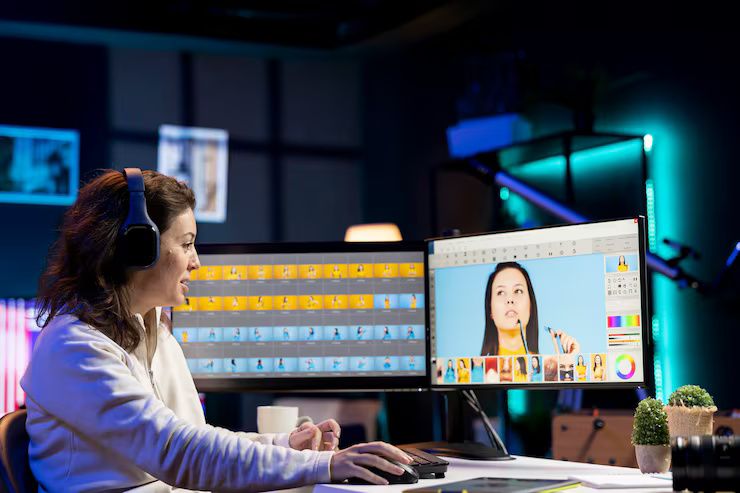
Picture this - how a screen behaves might shape the choices people make while setting up an edit station. Dive into what actually shifts how well a display handles shades, speeds through tasks, keeps colors true, and supports steady progress over weeks of cutting footage.
Monitor Quality Affects Video Editing Accuracy
From start to finish, video editing demands attention beyond cutting scenes or lining up shots. Picture quality holds weight - shade of colors, light levels, how crisp things look, differences between frames - all get checked, rechecked, adjusted. Every scene ties into the next through steady visuals, not just timing.
Wrong colors might show up if the screen isn’t good. Oversaturation creeps in, hiding what’s really there. Dark areas? They often go too deep to see clearly. Bright spots turn into blobs without clear edges. Judging them becomes a guessing game. What you tweak today could look off tomorrow elsewhere. Different displays reveal mismatched results nobody planned.
A solid editing screen makes visuals easier to trust. Because of that steady look, choices get sharper while surprise issues at handoff drop away.
Understanding Color Accuracy
When it comes to picking a screen for editing videos, getting colors right tends to matter more than most features. Though brightness and size play roles too, true-to-life hues usually take center stage. Some might overlook contrast or resolution at first, yet color precision keeps standing out. It shapes how faithfully the final product appears on different displays later down the line.
On-screen hues should look just like the real thing, matching both source files and what ends up printed or published. When colors stay true, editing feels more certain because choices reflect reality.
Several factors influence color accuracy:
- Color gamut coverage
- Factory calibration quality
- Panel technology
- Color consistency across the display
- Calibration support
Most videos today carry rich color detail - something only certain monitors reveal clearly. Where standard screens fall short, others show subtle shifts in shade you might otherwise miss. Working with recent film styles means needing tools that keep up visually. A display built for broader color gives depth, making scenes look closer to real life. Details emerge sharply, especially where lighting changes fast or softly across frames.
Important Screen Features to Think About
One thing about video editing screens: they’re rarely alike when it comes to specs. Picking the right one gets easier once you know what display traits actually matter.
Resolution
Resolution determines how much detail a monitor can display.
A single pixel shift might reveal what was hidden before, especially when editing fine details. Efficiency sneaks in through cleaner layouts, where timelines stretch out like open roads on a monitor built for precision.
A sharper screen can make daily editing feel smoother, particularly with complex video projects. When visuals demand precision, extra pixels help ease the workload. Working through fine details becomes less taxing on the eyes over time. Crisp displays support clearer timelines, thumbnails, and effects views. For many editors, clarity means fewer interruptions, better flow.
Panel Technology
A bright screen often shapes how clear things look. Picture sharpness depends heavily on what kind of glass sits up front.
Most screens handle colors differently, depending on what kind they are. When working on edits, seeing true colors matters a lot. Some types keep those colors steady even if you look from the side. Others shift when viewed at an angle. Contrast changes between them too. Reliable results usually come from panels that hold their ground across different views.
Picking a screen type might change how true colors look when you’re tweaking images. What shows up could shift based on the display used while adjusting details. A different panel may alter brightness just as much as contrast does during corrections. Sometimes the way shades appear leans heavily on what kind of monitor runs them. How close tones match real life often ties back to the screen tech chosen earlier.
Brightness and Contrast
When brightness shifts, how clearly you see the screen changes too. Dark parts stand out more from light ones depending on contrast settings.
Brightness that hits the mark teams up with sharp contrast so editors can judge shadows, bright areas, plus how balanced an image feels - all with better clarity.
When handling today’s video formats, which carry more detailed visuals, these traits start to matter a lot more. Not every detail stands out at first, yet their role grows clear during playback. With richer image data comes a greater need for precision. That shifts how each feature performs under pressure. Subtle differences show up only after repeated testing. Still, consistency remains key across varied conditions.
The Link Between Bigger Monitors and Getting More Work Done
Monitor size can significantly influence workflow efficiency.
A big screen gives you extra room to spread out your work. Editors can fit their timeline here, place previews there, keep media nearby, while tools stay within reach. Space makes it easier to manage everything at once.
Just because a screen is bigger doesn’t mean it's right for you. How much space you have plays a role, along with how far away you sit when using it. Personal habits while working on projects matter too - each factor shapes what feels best.
A workspace built for long edits often fits neatly on a desk, fitting both eye comfort and room limits. Screen size matters just as much as pixel clarity when hours pass in one sitting. Some find too big crowds the chair away from drawers or lamps. Others need sharpness without sacrificing elbow room near keyboards. Each choice shapes how tiring the day feels by sunset.
Color Spaces Shape Editing Choices
Color spaces define the range of colors a monitor can display.
One setting might need colors that work on phones, another for TV screens. Where it will be seen shapes what color rules apply. Delivery needs help decide which system fits best.
When handling different types of content, editors tend to focus on color space range - since accurate color judgment in editing depends heavily on it. Not every format behaves the same way under varying displays, which makes consistent coverage essential. Without proper alignment, what appears correct on one screen might look off elsewhere. Matching hues closely relies on a reliable spectrum being supported throughout the workflow. That kind of precision helps avoid surprises down the line.
When colors shift unexpectedly, it often traces back to mismatched settings across devices. Editors who grasp these differences avoid surprises later on. Matching the look from camera to screen means paying attention early. A solid grip on these systems keeps results predictable. Without that awareness, tones drift in ways viewers notice.
Picture color precision not as one fixed number, yet see how shades cover part of what makes visuals feel true. Instead of fixating on a lone detail, notice the way gamut behavior shapes how real images appear.
Tools That Help Edit Faster
Picture clarity aside, today’s screens sometimes carry tools that fit right into how pros get work done.
Useful workflow capabilities may include:
- Flexible connectivity options
- Adjustable ergonomic stands
- Multi-device support
- Picture-by-picture viewing
- Integrated USB connectivity
- Custom display presets
Even if these traits don’t change how sharp a picture looks, they might make your routine smoother. A tidier setup often comes from tools you didn’t expect to matter.
Smooth work happens when what you see matches how it feels to use. Sometimes speed matters more than looks, yet comfort changes everything. A quiet interface can surprise you by making tasks simpler. What runs fast might still feel off if the design ignores flow. Good tools balance sight and touch without calling attention to either.
Keeping Monitors Calibrated Over Time
Over months, even the best screens shift in subtle ways.
Over time, how a screen shows colors can change little by little. Because of wear, how often it runs, and where it sits. Matching its output regularly keeps tones looking the way they should. Even as years pass and pixels fade slightly at the edges.
Regular calibration can help editors:
- Maintain color consistency
- Improve editing accuracy
- Reduce display drift
- Support reliable project delivery
Working with colors means some makers check their tools again and again. That steady habit keeps edits looking right every time.
When work stretches across weeks or months, staying on one path keeps visuals matching step by step. A steady hand matters most as time moves forward through each phase.
Challenges People Face Choosing an Editing Monitor
Most times, picking a screen for cutting videos means juggling several needs at once.
Color precision matters most to a few people. For others, what counts is how sharp the display looks. Screen dimensions play a bigger role sometimes. Connections that fit smoothly into setups make a difference too. How well it fits in your work area can tip the balance. What works best ties directly to how you edit. Your process shapes the right pick.
Common considerations include:
- Available workspace
- Editing software requirements
- Type of material currently getting made
- Multi-monitor setups
- Long-term upgrade plans
Creators might pick a better monitor by paying attention to these details, fitting today’s tasks along with what comes later. A good choice now could handle whatever happens next.
Looking past one detail, weighing everything together usually works out better over time.
What video editing screens might look like later
Fresh screens shape how videos get made today. Still, changes in display tech march forward hand in hand with shifts in editing styles. New tools appear without warning, nudging filmmakers toward different choices. Each update quietly alters what feels possible behind the camera.
Now sharper colors show up clearer on screens because of new tweaks behind the scenes. With filmmakers using bulkier files and trickier setups, displays quietly shift to keep pace. Brighter blacks appear alongside truer whites thanks to unseen upgrades inching forward. When video gets denser, hardware answers without making a fuss. Little by little, lag fades while accuracy climbs through smarter timing tricks.
Out of nowhere, artificial intelligence started shaping how displays are managed, thanks to smarter automation and smoother workflows. Meanwhile, better connections between devices quietly make tangled production setups easier to handle.
Even with better editing tools arriving, how screens perform still shapes smooth and precise work behind the scenes. While tech grows smarter, display quality quietly holds its ground in shaping reliable results.
Conclusion
Picture this: a screen built for cutting clips does way more than just show images. Think of it as your main tool for judging shots, shaping ideas, laying down edits, keeping tones steady from start to finish. What makes one stand out? Hints lie in how true colors look, sharpness level, what kind of panel sits inside, ability to handle wide color ranges, plus handy tools that fit smoothly into daily tasks.
When these factors shape what you see on screen along with your workflow, a smart setup helps match colors properly while moving projects forward smoothly. Even as tools change in video creation, picking the correct display still shapes how trustworthy and polished edits turn out.

Related Post...
B2B Software Engineering DevOps Testing Grids: Discover Modern Test Automation
Updated: October 06, 2026
Read More
Industrial Warehouse Robotics Automation: Insights Into Modern Warehouse Operations
Updated: October 06, 2026
Read More
Industrial Fire Suppression System Inspection: A Guide to Equipment Readiness
Updated: October 02, 2026
Read More