Smart Office Automation Controller Systems: Explore How Centralized Control Works
Modern offices rely on lighting, heating and cooling, access control, meeting room equipment, and other building technologies to support daily operations.
Smart office automation controller systems bring these functions together, allowing different devices to respond to schedules, occupancy, environmental conditions, and user commands.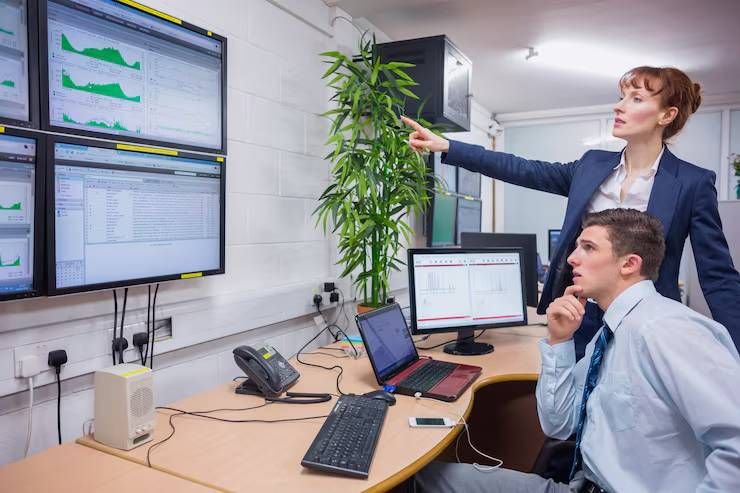
As workplaces incorporate connected devices and energy management technologies, centralized control helps facility teams coordinate systems that might otherwise operate independently. Instead of adjusting every device separately, authorized users can manage compatible equipment through a shared interface.
Understanding how centralized office automation works involves looking at controllers, communication protocols, sensors, software, and control logic. These components determine how devices exchange information, respond to changing conditions, and maintain reliable office operations.
How Centralized Office Control Works
A centralized automation system uses a controller or coordinated group of controllers to manage connected building equipment. The controller receives information from sensors, user interfaces, and other systems, then applies programmed rules to determine the appropriate response.
For example, an occupancy sensor may detect that a meeting room is empty. The controller can use that information to switch off lighting or adjust the room's environmental settings, provided the connected equipment and control rules support those actions.
Centralized control does not always mean that every device connects directly to one physical unit. Larger offices often use distributed controllers that manage individual floors, rooms, or equipment groups while communicating with a central management platform.
This arrangement allows local functions to continue operating according to their design while facility teams monitor broader building performance from a shared interface.
The Main Components of an Automation Controller System
A smart office automation system combines hardware and software components. Each component performs a specific role in collecting information, processing commands, or controlling equipment.
Controllers execute automation logic and send commands to compatible devices. Depending on the system, a controller may manage lighting circuits, room temperature, blinds, ventilation interfaces, or several related functions.
Sensors provide information about the physical environment. Occupancy detectors, temperature sensors, humidity sensors, daylight sensors, and air-quality monitors help the system respond to actual conditions rather than relying exclusively on fixed schedules.
Actuators carry out commands by operating equipment. They may control relays, dimmers, motorized blinds, valves, or other compatible mechanisms.
Communication networks allow controllers, sensors, and devices to exchange information. Wired connections, wireless networks, and building automation protocols may be used depending on the application.
Management software provides dashboards, schedules, configuration tools, alerts, and operational reports. Facility managers can use these interfaces to review system status and adjust authorized settings.
The effectiveness of the overall system depends on how reliably these components work together. A capable controller cannot deliver accurate automation if its sensors provide poor data or the connected equipment cannot interpret its commands.
How Office Systems Communicate With Each Other
Communication is a central consideration when designing office automation. Different manufacturers may use different protocols, data formats, and control methods, so compatibility must be evaluated before equipment is integrated.
Building automation environments commonly use protocols such as BACnet, Modbus, and KNX. BACnet is widely associated with building automation and control networks, Modbus is frequently used in industrial and equipment communications, and KNX supports building functions such as lighting, shading, and environmental control.
These protocols serve different purposes and do not automatically make every device interchangeable. Integration may require compatible interfaces, gateways, appropriate configuration, or additional software.
For example, an office management platform may need to exchange information with a heating, ventilation, and air-conditioning controller manufactured by a different company. A suitable integration layer translates or maps the relevant data so that the systems can communicate meaningfully.
Interoperability should therefore be considered during planning, rather than treated as a problem to solve after installation.
Coordinating Lighting, Climate, and Meeting Rooms
Centralized control becomes useful when multiple office functions need to respond to the same conditions. Instead of managing each subsystem independently, automation rules can coordinate equipment according to room use, operating hours, and environmental requirements.
Lighting controls can combine occupancy detection with daylight measurements to adjust illumination. In areas with sufficient natural light, compatible dimming equipment can reduce artificial lighting while maintaining the intended lighting conditions.
Heating and cooling systems can use occupancy information and temperature readings to apply appropriate room settings. However, effective control must account for ventilation requirements, equipment limitations, and the need to maintain suitable indoor conditions.
Meeting rooms present another practical application. A coordinated room system may manage lighting scenes, displays, blinds, and other compatible equipment through a single interface. Preset modes can simplify the process of preparing a room for presentations, video conferences, or collaborative work.
These functions depend on careful configuration. Poorly designed automation can cause conflicting commands, uncomfortable temperature changes, or equipment that responds at the wrong time.
How Automation Rules and Schedules Are Designed
Controllers follow defined logic rather than making arbitrary decisions. Automation rules specify the conditions under which an action should occur, the devices involved, and any limits or exceptions that apply.
A basic rule might instruct the lighting system to turn off after a room remains unoccupied for a defined period. A more advanced rule could combine occupancy, daylight levels, business hours, and manual user preferences before changing lighting output.
Schedules provide another layer of control. Facility teams can define normal operating hours, weekend settings, holiday schedules, and different conditions for specific areas of a building.
Well-designed systems also account for manual overrides. If someone adjusts a room setting, the automation logic should define how long that change remains active and when normal control resumes.
Testing these rules is essential. Sensors can produce inaccurate readings, schedules can conflict, and connected equipment may respond differently than expected. Clear priorities and sensible fallback behavior help prevent these issues from disrupting office operations.
Integrating Automation With Existing Building Infrastructure
Many offices already have lighting controls, HVAC equipment, access systems, and building management software. Introducing centralized automation may involve connecting these existing systems rather than replacing all of them.
The first step is to identify available interfaces, communication protocols, control capabilities, and operational limitations. Some equipment supports direct integration, while older devices may require gateways or additional control hardware.
A phased approach can help organizations introduce automation by floor, department, or function. For example, a facility team might begin with lighting and meeting room controls before integrating environmental monitoring and broader building management functions.
Integration planning should also define which system has authority over each function. If two controllers attempt to change the same setting independently, their commands may conflict.
Clear control ownership, documented interfaces, and consistent naming conventions make the installation easier to operate and maintain over time.
Security and Reliability in Connected Offices
Connected office systems introduce cybersecurity and operational considerations because controllers may communicate through building networks or remotely accessible management platforms.
Access should be limited according to user responsibilities. Facility operators may need permission to change environmental settings, while administrators may require broader configuration privileges. Strong authentication, secure network segmentation, timely software updates, and documented access procedures help reduce exposure.
Reliability also depends on what happens when communication fails. Some controllers can continue executing local rules during a temporary connection loss, while other functions may depend on a central server or external network.
Designers should identify which operations must continue during outages and establish appropriate fallback behavior. Critical building functions should retain their required independent safeguards rather than relying entirely on an office automation interface.
Regular testing, backups of configuration settings, maintenance records, and clear recovery procedures support dependable operation.
Measuring Performance After Installation
Installing automation equipment is only one stage of the process. The system must also be evaluated under normal working conditions to determine whether its control logic performs as intended.
Facility teams can review lighting schedules, temperature stability, equipment runtime, occupancy patterns, system alarms, and energy consumption where suitable metering is available. Comparing operating data over time can help reveal unnecessary runtime, recurring faults, or poorly configured schedules.
Measurements should be interpreted in context. Changes in weather, occupancy, working hours, and equipment use can affect energy consumption, so a simple before-and-after comparison may not establish that automation alone caused an improvement.
Feedback from employees and facility staff is equally useful. Complaints about lighting, room temperature, or confusing controls may reveal issues that technical dashboards do not capture.
Frequently Asked Questions
What is a smart office automation controller?
It is a hardware device or coordinated control system that manages compatible office equipment using programmed rules, sensor information, schedules, and user commands.
Can one controller manage the entire office?
Sometimes, but larger buildings commonly use multiple controllers connected to a central management platform. The design depends on building size, equipment requirements, network architecture, and the functions being automated.
Does office automation work with existing equipment?
It can, provided the equipment supports a compatible interface or can be connected through an appropriate gateway. Compatibility should be checked before integration begins.
Can centralized control reduce energy use?
It can help reduce unnecessary lighting and equipment runtime by responding to occupancy, schedules, and environmental conditions. Actual results depend on system configuration, building use, and the performance of existing equipment.
What happens if the central network stops working?
The outcome depends on the system architecture. Some local controllers continue operating independently, while centrally dependent functions may be interrupted. These behaviors should be established during system design and testing.
Conclusion
Smart office automation controller systems coordinate connected building technologies through controllers, sensors, communication networks, and programmed rules. Centralized management makes it easier to oversee lighting, climate control, meeting spaces, and other compatible equipment from a shared operational interface.
Successful implementation depends on more than connecting devices. Interoperability, clear control logic, cybersecurity, reliable fallback behavior, and ongoing performance monitoring all contribute to a system that supports everyday office operations.

Related Post...

Corporate Server Room Cooling Systems: Explore Precision Temperature Control
Updated: October 02, 2026
Read More
Cloud Server Hosting and VPS Deployments Explore Server Configuration Options
Updated: October 19, 2026
Read More