Smart Home Camera Guide: Video Monitoring, Connected Security, Privacy Factors, and Technology Insights
Smart home cameras are connected video devices that allow homeowners to monitor areas around or inside a property using cameras, sensors, software, and network connectivity.
Depending on the system, cameras may provide live video, motion notifications, two-way audio, night vision, recording, object detection, and integration with other smart-home devices.
Modern camera systems can use cloud platforms, local storage, or a combination of both.
Why Smart Home Cameras Matter
Connected cameras can provide visibility into activity around a home and may integrate with broader home-automation systems.
Common applications include:
Entryway monitoring
Door and driveway monitoring
Indoor video monitoring
Package-area monitoring
Garage monitoring
Outdoor property observation
Motion notifications
Remote video access
Two-way communication
Smart-home automation
Camera capabilities vary significantly by model, software platform, network connection, and subscription structure.
Types of Smart Home Cameras
Smart cameras can be designed for different locations and purposes.
Indoor cameras
Indoor cameras are generally designed for monitoring rooms and interior areas. They may include privacy modes, motion detection, two-way audio, and mobile notifications.
Outdoor cameras
Outdoor cameras are designed for exterior environments and may include weather-resistant construction, night vision, wider viewing angles, and mounting options.
Doorbell cameras
Video doorbells combine a camera with a doorbell and communication features. Depending on the system, they may provide visitor notifications, live video, two-way audio, and motion detection.
Pan-tilt cameras
Pan-tilt cameras can remotely adjust their viewing direction and may provide broader coverage than fixed-position cameras.
Floodlight cameras
Some outdoor cameras integrate lighting with video monitoring and motion detection.
Video Monitoring Features
Smart home camera features can vary considerably.
Common capabilities include:
Live video
Motion detection
Sound detection
Night vision
Two-way audio
Digital zoom
Wide-angle viewing
Activity notifications
Person or object detection
Scheduled recording
Activity zones
Event history
Some systems use software-based analysis to distinguish between different types of activity.
Users should review how these features work rather than assuming that detection technology will identify every event accurately.
Video Storage Options
Smart cameras generally use one or more storage approaches.
Cloud storage
Video recordings are transmitted to a remote service for storage and access.
Potential advantages include remote accessibility and centralized storage.
Considerations can include internet dependence, account security, privacy practices, storage policies, and recurring platform requirements.
Local storage
Some cameras store recordings on memory cards, local storage devices, or home network equipment.
Local storage can reduce dependence on external storage platforms, but users may need to manage storage capacity, backups, physical security, and device reliability.
Hybrid storage
Some systems combine local recording with cloud-based features.
The appropriate approach depends on privacy preferences, network reliability, storage needs, device capabilities, and the importance of remote access.
Smart Home Integration
Smart cameras can interact with other connected devices.
Possible integrations include:
Smart lighting
Smart locks
Motion sensors
Door sensors
Smart speakers
Home automation platforms
Security alarms
Connected displays
For example, a compatible camera may trigger a light or send a notification when motion is detected.
Interoperability depends on supported communication standards, manufacturer ecosystems, software platforms, and device compatibility.
Connectivity and Network Requirements
Smart cameras typically require a reliable network connection.
Connectivity may involve:
Wi-Fi
Ethernet
Cellular connections for selected systems
Bluetooth for setup or auxiliary functions
Smart-home communication standards
Video streaming can consume significant network bandwidth, particularly when multiple cameras operate simultaneously.
Before installing multiple cameras, users should consider:
Wi-Fi coverage
Upload capacity
Network congestion
Camera placement
Power availability
Router capabilities
Backup connectivity
Privacy Considerations
Smart cameras can collect highly sensitive information because video recordings may reveal household activities, visitors, family members, employees, neighbors, or other identifiable individuals.
Privacy planning can include:
Camera placement
Recording schedules
Privacy zones
Audio settings
Data retention
Account permissions
Shared access
Cloud-storage policies
Data deletion
Third-party integrations
Cameras should generally be positioned with consideration for the privacy expectations of people who may be recorded.
Local laws can also regulate surveillance, audio recording, workplace monitoring, or recording in areas where people have a reasonable expectation of privacy.
Cybersecurity
Connected cameras can create another point of access to a home network.
Important security practices can include:
Strong unique passwords
Multi-factor authentication
Current firmware
Secure Wi-Fi
Updated mobile applications
Limited account permissions
Secure administrator accounts
Appropriate network segmentation
Review of connected third-party applications
Users should also understand whether a camera remains accessible when a manufacturer's account is compromised and what recovery procedures are available.
Motion Detection and Alerts
Motion detection can help reduce the need to continuously watch live video.
Users may be able to configure:
Activity zones
Motion sensitivity
Person detection
Vehicle detection
Animal detection
Notification schedules
Alert thresholds
Improper settings can result in excessive alerts or missed activity.
Environmental conditions such as lighting, weather, camera positioning, reflections, and moving vegetation can also affect detection performance.
Video Quality and Camera Placement
Higher video resolution can provide more image detail, but resolution is only one factor affecting useful video.
Other considerations include:
Field of view
Lens quality
Low-light performance
Dynamic range
Camera position
Lighting
Night-vision capability
Digital compression
Recording settings
Placement should account for the area being monitored, available lighting, power, weather exposure, network connectivity, and privacy considerations.
Wired vs. Wireless Cameras
Smart cameras can use wired or wireless configurations.
Wired cameras may provide a stable network connection and continuous power, depending on the installation.
Wireless cameras can simplify placement where suitable power and Wi-Fi are available, but wireless performance depends on network coverage and environmental conditions.
Some systems combine wired power with wireless networking.
The appropriate configuration depends on the property, camera location, network architecture, and installation requirements.
Smart Home Camera Planning
A practical camera-planning process can follow:
Identify Areas → Evaluate Privacy → Check Connectivity → Select Features → Configure Storage → Secure Accounts → Test Alerts
Users can begin by identifying specific monitoring needs rather than installing cameras solely based on maximum coverage.
A smaller number of appropriately positioned cameras may provide more useful coverage than poorly positioned devices.
Legal and Regulatory Considerations
Camera use can be subject to different rules depending on location and circumstances.
Relevant considerations can include:
Privacy laws
Audio-recording rules
Residential surveillance requirements
Homeowners association rules
Rental-property requirements
Workplace monitoring rules
Data-protection obligations
Local recording restrictions
Audio recording can raise additional legal issues because some jurisdictions impose specific requirements concerning consent.
Property owners using cameras in rental or shared environments should also review applicable landlord-tenant and privacy requirements.
Recent Technology Developments
Smart-camera technology continues to incorporate software-based analysis, edge processing, improved low-light performance, and broader smart-home integration.
Recent technology trends include:
On-device video analysis
AI-assisted object detection
Improved person recognition
Local video processing
Privacy-focused processing
Smart-home interoperability
More flexible storage options
Improved low-light imaging
Automated activity classification
Processing video locally can reduce the amount of information transmitted to external platforms in some systems, although the exact privacy characteristics depend on device architecture and manufacturer practices.
Smart Home Camera Checklist
Before selecting or configuring a camera system, consider:
Identify the areas that require monitoring
Review privacy implications
Check local surveillance and recording rules
Evaluate indoor or outdoor requirements
Check network coverage
Confirm power requirements
Review video quality
Compare storage options
Check retention policies
Enable appropriate account security
Review third-party integrations
Configure activity zones
Test notifications
Update firmware regularly
Review camera access permissions
Tools and Resources
Useful smart-home camera resources can include:
Camera mobile applications
Home network-management tools
Router security controls
Cloud-storage dashboards
Local storage devices
Smart-home automation platforms
Camera placement plans
Privacy settings
Manufacturer security documentation
Firmware-update systems
Local privacy and surveillance regulations
Users should consult manufacturer documentation for specific device capabilities and applicable government resources for local privacy or recording requirements.
Frequently Asked Questions
What is a smart home camera?
A smart home camera is a connected video device that can provide live viewing, recording, notifications, or other software-enabled features through a home network or connected platform.
Do smart home cameras need Wi-Fi?
Many smart cameras use Wi-Fi, but some systems can use Ethernet or other connectivity methods. The required connection depends on the camera and its features.
Are smart home cameras private?
Privacy depends on camera placement, storage architecture, account security, data practices, retention settings, and applicable laws. Users should review privacy controls and manufacturer policies before configuring a camera system.
Can smart cameras work with other home devices?
Compatible cameras can integrate with lighting, locks, sensors, alarms, speakers, displays, and home-automation platforms. Compatibility varies by device and ecosystem.
Should smart camera recordings be stored locally or in the cloud?
Both approaches have different considerations. Cloud storage can simplify remote access, while local storage can provide greater control over where recordings are retained. The appropriate choice depends on privacy, accessibility, network reliability, storage, and security requirements.
Conclusion
Smart home cameras combine video monitoring, connectivity, software, storage, and smart-home integration.
Choosing and configuring a camera system requires more than comparing video resolution. Network reliability, camera placement, storage, privacy, cybersecurity, detection features, power requirements, and legal considerations can all affect how the system functions.
Because surveillance and recording requirements vary by location and use case, users should review current applicable rules, manufacturer documentation, and privacy practices before deploying connected cameras.

Related Post...

Real Estate Due Diligence Guide: Property Records, Financial Review, Risk Factors, and Planning Tips
Updated: September 29, 2026
Read More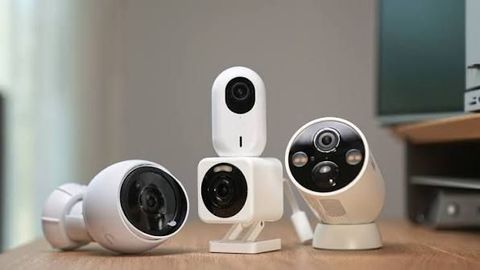
Smart Home Camera Guide: Video Monitoring, Connected Security, Privacy Factors, and Technology Insights
Updated: September 29, 2026
Read More
Sewer Line Guide: Pipe Inspection, Replacement Methods, and Drainage System
Updated: September 18, 2026
Read More