Complete AI Workflow Guide: Explore Automation, Architecture, Applications & Expert Insights
Artificial intelligence is increasingly being integrated into business processes, software applications, research environments, content operations, customer interactions, data analysis, and everyday digital workflows. Instead of using AI as an isolated tool, organizations are increasingly connecting AI models with data sources, applications, automation platforms, databases, and human decision-making processes.
This connected structure is commonly referred to as an AI workflow.
An AI workflow defines how information enters a system, how it is processed, where artificial intelligence is applied, how decisions are generated, and what happens with the resulting output. Depending on the application, an AI workflow may include simple automated steps or complex multi-stage processes involving large language models, machine learning systems, APIs, databases, human review, and automated actions.
This guide explains what an AI workflow is, how its architecture works, which components are commonly involved, how automation is implemented, where AI workflows are used, and what trends are shaping their future.
What Is an AI Workflow?
An AI workflow is a structured sequence of tasks in which artificial intelligence is used to analyze information, generate outputs, make predictions, classify data, or support automated decisions.
A basic AI workflow can follow this structure:
Input → Data Processing → AI Model → Decision or Output → Action → Monitoring
For example, an organization could receive a customer message, automatically classify its subject using an AI model, generate a response, route complex cases to a human employee, and record the interaction for future analysis.
AI workflows can therefore combine both AI-powered tasks and conventional software automation.
How Does an AI Workflow Work?
Although implementations vary, most AI workflows follow several fundamental stages.
1. Input Collection
The workflow first receives information.
Inputs may include:
- Text
- Documents
- Images
- Audio
- Video
- Sensor data
- Database records
- User requests
- API responses
The input determines what subsequent processing is required.
2. Data Preparation
Raw information may need to be cleaned, structured, transformed, or validated.
This stage can involve:
- Data cleaning
- Format conversion
- Duplicate removal
- Classification
- Data extraction
- Metadata creation
- Validation
Good input quality is important because AI output depends heavily on the information supplied to the system.
3. AI Processing
The prepared information is sent to an appropriate AI system.
Depending on the use case, this may involve:
- Large language models
- Machine learning models
- Computer vision systems
- Speech recognition models
- Recommendation engines
- Classification models
- Predictive analytics
The model processes the information and produces an output.
4. Decision Making
The workflow may then evaluate the AI output.
For example:
- If confidence is high, continue automatically.
- If confidence is low, request human review.
- If a specific category is detected, send the information to another system.
This stage introduces decision logic into the workflow.
5. Action
The workflow performs a predefined action based on the result.
Actions may include:
- Sending an email
- Updating a database
- Creating a report
- Generating content
- Updating a CRM record
- Triggering another application
- Assigning a task
6. Monitoring
The final stage involves monitoring the workflow.
Organizations may track:
- Accuracy
- Processing time
- Failure rates
- Model responses
- API usage
- Human intervention
- Operational costs
Monitoring helps identify problems and improve workflow performance.
AI Workflow Architecture
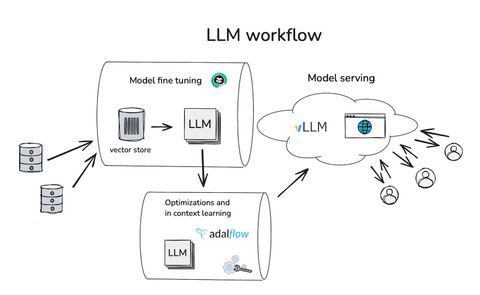
AI workflow architecture describes how different technical components interact to complete an automated process.
A typical architecture may include:
Data Sources → Integration Layer → Processing Layer → AI Model → Decision Engine → Application Layer → Monitoring
Each layer performs a specific function.
Data Sources
AI workflows can obtain information from many sources.
Examples include:
- Databases
- Websites
- APIs
- Cloud storage
- Enterprise applications
- Documents
- Customer platforms
- IoT devices
The workflow determines which sources are relevant to the task.
Integration Layer
The integration layer connects different applications and systems.
It may use:
- APIs
- Webhooks
- Connectors
- Middleware
- Automation platforms
This layer allows AI systems to interact with external applications.
Processing Layer
The processing layer prepares information before it reaches the AI model.
Common tasks include:
- Data transformation
- Filtering
- Chunking
- Parsing
- Validation
- Feature extraction
This stage can be particularly important when large or unstructured datasets are involved.
AI Model Layer
The model layer performs the primary AI task.
Different models can be selected depending on the requirement.
For example:
- Language models for text
- Vision models for images
- Speech models for audio
- Predictive models for numerical data
- Recommendation models for personalization
Decision Layer
A decision layer determines what should happen after the AI generates a result.
It may include:
- Business rules
- Confidence thresholds
- Conditional logic
- Routing mechanisms
- Human approval
This makes the workflow more controlled and predictable.
Application Layer
The application layer connects the workflow to the environment where the result is used.
Examples include:
- CRM systems
- ERP platforms
- Websites
- Mobile applications
- Email systems
- Analytics dashboards
- Internal business applications
Monitoring Layer
Monitoring systems track workflow performance.
Important metrics can include:
- Success rate
- Response latency
- Model accuracy
- Error frequency
- Resource usage
- Human review rate
AI Workflow Automation
AI workflow automation combines artificial intelligence with conventional process automation.
Traditional automation generally follows predefined rules.
For example:
If a form is submitted → create a record.
An AI-powered workflow can interpret information before deciding what should happen.
For example:
Receive document → extract information → classify document → identify important fields → validate information → update database.
The AI component provides interpretation while automation handles execution.
AI Agents and Workflows
AI agents can extend workflows by allowing AI systems to perform multiple actions toward a defined objective.
An agent-based workflow may:
- Receive a task
- Analyze available information
- Select an action
- Use a connected tool
- Evaluate the result
- Continue or change strategy
- Complete the task
This differs from a simple workflow where every step is predetermined.
AI Workflow vs Traditional Automation
Traditional automation is usually rule-based.
AI workflows can handle:
- Unstructured information
- Natural language
- Images
- Complex classification
- Probabilistic decisions
- Context-dependent tasks
The two approaches can also be combined.
A business may use conventional rules for deterministic tasks while using AI for interpretation and reasoning.
Role of APIs
APIs are essential for connecting AI models to other applications.
An API can allow a workflow to:
- Send data to an AI model
- Receive model output
- Retrieve information
- Update another system
- Trigger an external service
API-based architecture allows different technologies to operate together.
Role of Databases
Databases store information used by AI workflows.
They may contain:
- Customer records
- Product information
- Transaction data
- Documents
- Historical interactions
- Workflow logs
The workflow can retrieve relevant information when required.
AI Workflow and Data Processing
Data processing is one of the most important parts of an AI workflow.
Depending on the application, information may need to be:
- Cleaned
- Structured
- Categorized
- Enriched
- Converted
- Validated
Poorly structured data can reduce the reliability of downstream AI processing.
Retrieval-Augmented Generation
For knowledge-intensive applications, AI workflows can incorporate Retrieval-Augmented Generation (RAG).
A simplified RAG workflow is:
Question → Search Knowledge Base → Retrieve Relevant Information → AI Model → Generated Response
This approach allows an AI application to use information from a specific knowledge source instead of relying only on information embedded within the model.
Human-in-the-Loop Workflows
Not every AI decision should be fully automated.
Human-in-the-loop systems introduce people into important stages of the workflow.
For example:
AI Analysis → Confidence Check → Human Review → Final Decision
Human review can be useful when:
- Decisions are sensitive
- Accuracy requirements are high
- Information is ambiguous
- AI confidence is low
- Regulatory requirements apply
AI Workflow Applications
AI workflows are being explored across numerous industries and business functions.
Customer Support
AI workflows can:
- Classify customer questions
- Identify intent
- Retrieve relevant information
- Generate draft responses
- Route complex cases
- Summarize conversations
Human representatives can handle cases requiring additional judgment.
Marketing
AI workflows can support:
- Content ideation
- Audience analysis
- Campaign reporting
- Content classification
- Social media planning
- Performance analysis
Sales
Sales workflows may use AI to:
- Analyze customer information
- Classify leads
- Summarize conversations
- Generate follow-up drafts
- Identify relevant records
Finance
AI workflows can assist with:
- Document processing
- Transaction classification
- Report generation
- Data analysis
- Anomaly identification
Financial decisions may still require appropriate human oversight and controls.
Human Resources
Possible applications include:
- Document organization
- Employee query classification
- Internal knowledge retrieval
- Training content generation
- Workflow notifications
Sensitive employment decisions require careful governance and human oversight.
Healthcare
AI workflows can support certain administrative and analytical processes such as:
- Document organization
- Medical image analysis
- Research assistance
- Scheduling workflows
- Data classification
Healthcare applications require appropriate professional oversight, privacy protections, and regulatory compliance.
Manufacturing
AI workflows can support:
- Predictive maintenance
- Quality inspection
- Production monitoring
- Equipment analysis
- Inventory planning
Education
Educational workflows may support:
- Content generation
- Research assistance
- Personalized learning
- Question generation
- Document analysis
AI Workflow for Document Processing
Document automation is a common AI workflow application.
A typical process may look like:
Document Upload → OCR → Text Extraction → Classification → Information Extraction → Validation → Database Update
This can be applied to:
- Invoices
- Forms
- Reports
- Contracts
- Applications
- Business records
AI Workflow for Content Creation
A content workflow can include:
- Topic identification
- Research
- Outline generation
- Draft creation
- Editing
- Quality review
- Publishing
AI can support individual stages while humans retain editorial control.
AI Workflow for Data Analysis
A data analysis workflow may involve:
- Data collection
- Data cleaning
- Statistical analysis
- Pattern identification
- Visualization
- Report generation
AI can assist with interpretation while analysts validate important conclusions.
AI Workflow for Software Development
AI-supported development workflows may include:
- Requirement analysis
- Code generation
- Code explanation
- Testing
- Debugging
- Documentation
- Code review
Developers remain responsible for validating generated code and ensuring security and reliability.
Benefits of AI Workflows
AI workflows can provide several operational advantages.
Increased Efficiency
Automating repetitive tasks can reduce the amount of manual processing required.
Faster Processing
AI can analyze large amounts of information quickly.
Improved Scalability
Automated workflows can process increasing volumes without requiring every task to be handled manually.
Better Consistency
Standardized workflows can provide more consistent processing.
Improved Data Utilization
AI can help extract useful information from unstructured data.
Reduced Repetitive Work
Employees can focus on tasks requiring creativity, communication, and judgment.
Challenges of AI Workflows
AI workflows also introduce several challenges.
Accuracy
AI systems can generate incorrect or incomplete outputs.
Validation mechanisms are therefore important.
Data Privacy
Workflows may process sensitive information.
Organizations should consider:
- Access controls
- Encryption
- Data minimization
- Retention policies
- Privacy requirements
Security
AI workflows can create additional attack surfaces through:
- APIs
- External applications
- Data connections
- Automated actions
Security should be incorporated into architecture from the beginning.
Integration Complexity
Connecting multiple systems can require:
- API development
- Data transformation
- Authentication
- Monitoring
- Error handling
Cost Management
AI workflows may incur costs associated with:
- Model usage
- Cloud infrastructure
- API requests
- Storage
- Monitoring
Efficient workflow design can help control resource usage.
AI Workflow Monitoring
Monitoring helps determine whether a workflow is performing as intended.
Useful metrics include:
- Completion rate
- Error rate
- Processing time
- AI accuracy
- Human escalation rate
- API response time
- Resource consumption
Error Handling
Reliable AI workflows should include mechanisms for handling failures.
For example:
AI Failure → Retry → Alternative Model → Human Review
Error-handling strategies reduce the risk of an entire workflow failing because of one unavailable component.
Security Considerations
AI workflow security can include:
- Authentication
- Authorization
- Encryption
- Secure APIs
- Input validation
- Output filtering
- Access management
- Audit logs
Security requirements should be evaluated according to the data and applications involved.
Governance
AI governance helps organizations establish rules for responsible AI use.
Governance may address:
- Data usage
- Model selection
- Human oversight
- Privacy
- Security
- Documentation
- Performance monitoring
How to Design an AI Workflow
A structured approach can make workflow development easier.
Step 1: Define the Objective
Clearly identify what the workflow needs to accomplish.
Step 2: Map the Existing Process
Document the current process before introducing automation.
Step 3: Identify AI Opportunities
Determine which steps require:
- Classification
- Prediction
- Generation
- Extraction
- Interpretation
Step 4: Select Technologies
Choose appropriate:
- AI models
- Databases
- APIs
- Automation platforms
- Monitoring systems
Step 5: Add Decision Rules
Define when the workflow should:
- Continue
- Stop
- Retry
- Escalate
- Request human review
Step 6: Test the Workflow
Testing should cover:
- Normal scenarios
- Incorrect inputs
- Missing data
- Model failures
- Integration failures
Step 7: Monitor and Improve
Performance data can be used to identify opportunities for refinement.
Emerging AI Workflow Trends
Several developments are shaping the future of AI workflows.
Agentic Workflows
AI agents are increasingly being integrated into workflows capable of planning and executing multiple actions.
Multimodal AI
Future workflows can process combinations of:
- Text
- Images
- Audio
- Video
This enables more sophisticated applications.
Smaller AI Models
Smaller models can be useful for applications requiring:
- Lower latency
- Reduced infrastructure requirements
- Local processing
- Specialized tasks
Edge AI
Edge AI processes information closer to where it is generated.
This can be valuable for:
- Manufacturing
- Vehicles
- IoT devices
- Robotics
AI Workflow Observability
As workflows become more complex, organizations are placing greater emphasis on tracking individual model calls, data flows, failures, and automated actions.
Human-AI Collaboration
Rather than completely replacing human workflows, many systems are being designed around collaboration between AI systems and human professionals.
Future of AI Workflows
AI workflows are expected to become increasingly interconnected, adaptive, and multimodal.
Future systems may combine:
- AI agents
- Large language models
- Robotics
- Real-time data
- Cloud platforms
- Edge computing
- Enterprise software
- Automated decision systems
This could allow organizations to build workflows capable of responding dynamically to changing conditions.
Frequently Asked Questions
What is an AI workflow?
An AI workflow is a structured sequence of tasks in which artificial intelligence is used to analyze information, generate outputs, make predictions, classify data, or support automated actions.
What is the difference between AI and automation?
Automation generally follows predefined rules, while AI can interpret information, recognize patterns, generate content, and support decisions. Combining both creates AI-powered workflows.
What are the main components of an AI workflow?
Common components include data sources, integration systems, processing layers, AI models, decision logic, application interfaces, monitoring tools, and human review mechanisms.
Can AI workflows operate without human involvement?
Some workflows can operate with minimal human intervention, particularly for low-risk and repetitive tasks. Other workflows require human review when decisions are complex, sensitive, or potentially consequential.
What is an AI agent workflow?
An AI agent workflow allows an AI system to interpret a goal, select actions, interact with tools, evaluate results, and continue through multiple steps toward completing the task.
What is RAG in an AI workflow?
Retrieval-Augmented Generation combines information retrieval with AI generation. The workflow retrieves relevant information from a knowledge source and provides it to an AI model to help produce a context-specific response.
What industries use AI workflows?
AI workflows are applicable to technology, marketing, finance, healthcare, manufacturing, education, customer support, logistics, research, and many other areas.
What are the main challenges?
Important challenges include accuracy, data privacy, cybersecurity, integration complexity, model reliability, monitoring, governance, and resource management.
Conclusion
AI workflows are becoming an important component of modern digital operations because they connect artificial intelligence with data, applications, automation systems, and human decision-making. Rather than treating AI as an isolated technology, workflow architecture enables organizations to integrate AI into structured processes where information can be collected, analyzed, interpreted, and transformed into useful actions.
From customer support and document processing to manufacturing, marketing, research, and software development, AI workflows can support a wide range of applications. Their effectiveness depends not only on the AI model itself but also on data quality, system architecture, integration, security, monitoring, and appropriate human oversight.
As AI agents, multimodal models, edge computing, and intelligent automation continue developing, AI workflows are likely to become more adaptive and interconnected. Understanding their architecture and operating principles therefore provides useful insight into how AI is being integrated into modern digital and business environments.
Disclaimer
This article is intended solely for educational and informational purposes. It provides a general overview of AI workflows, automation technologies, architectures, applications, and emerging trends. AI capabilities, software platforms, models, regulations, security practices, and implementation methods continue to evolve. AI-generated outputs may require human verification, particularly when workflows are used for sensitive, technical, financial, legal, healthcare, or other consequential applications. Readers should consult appropriate technical documentation, organizational policies, and qualified professionals when implementing AI systems.

Lavit
Our content is designed to attract, persuade, and convert your audience. We help brands grow through strategic, audience-first writing.
August 07, 2026 . 8 min read
Related Post...
Electric Vehicles Explained: An Informative Guide to Basic, Technology, and Everyday Use
By: Lavit
Updated: August 18, 2026
Read More
Latest Automotive Technology Guide: Explore EVs, AI, ADAS, Connected Cars & Future Mobility
By: Lavit
Updated: August 11, 2026
Read More
AI Framework Guide: Explore Types, Architecture, Development Tools, Applications & Key Concepts
By: Lavit
Updated: August 13, 2026
Read More